One Year With a Dumbphone
There is a growing trend, particularly amongst Gen Z, of people trying to "stop the scroll" or "take back their time" by disconnecting themselves from social media. It's no secret that online platforms like Facebook, Instagram, TikTok, and YouTube are designed to maximize the amount of time you spend on them, precisely because of the advertising revenue they collect from it. So, in a week when Facebook settled a case about the harms of social media addiction in children for 18 billion US dollars, I thought it appropriate to talk about my personal experience cutting phone addiction out of my life.
Relatedly, you can read about the distraction-free way I am still able to watch a curated subset of YouTube here.
Dumbphones
Back when mobile phones were first invented, they were called exactly that, mobile phones. Eventually, most phones became mobile, making the adjective redundant. Likewise, there was once a time when we referred to the devices most of us carry around as smartphones, but since they have become so pervasive, we just call them phones, using the term dumbphone to distinguish the not-so-smart phones from the phones most people use.
The term is now applied a little more broadly with the introduction of new phones that are still dumb but also substantially more convenient than the phones you would find 20 years ago.
The Mudita Kompakt
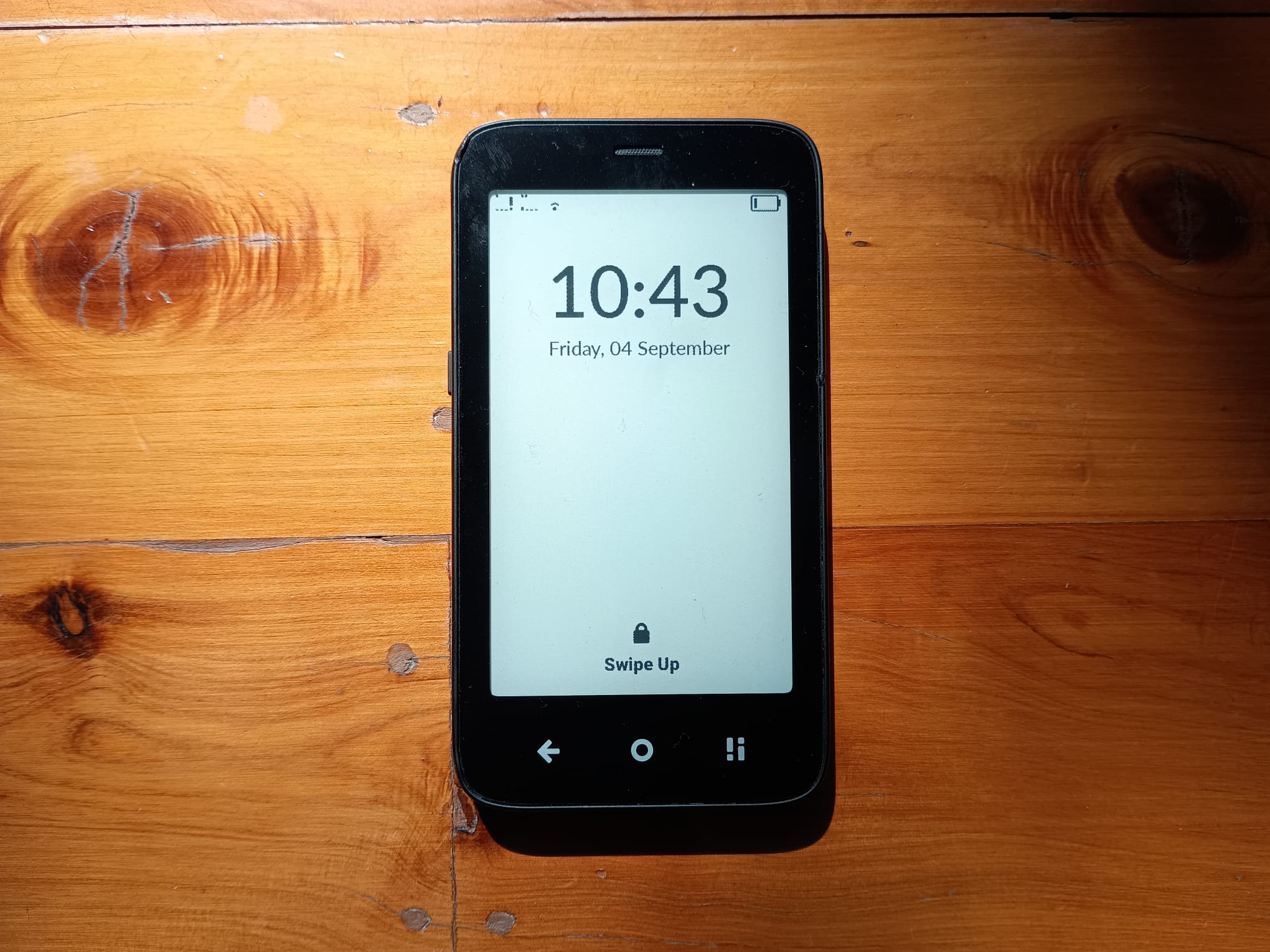
For the last year, I have been using a phone called the Mudita Kompakt. It is, out of the box, what I would call a "modern dumbphone".
You can use it to make calls, send text messages, set alarms, take photographs (with a rear view camera only), make notes, check the weather, and listen to music. It even has an offline maps app with navigation capabilities and a calendar app. There is no web browser, no app store, and most certainly no social media; this is the sense in which it is dumb, but if you are imagining a Nokia 3310, you are selling it short.
Unlike a phone from 2000, it has many conveniences to accommodate the modern world. For instance, if you try to connect to a public Wi-Fi network with an HTML login page, you can do this despite not having a general web browser. It has a fingerprint reader for unlocking, can be used as a mobile hotspot, and even has a dual-SIM card tray and eSIM support.
It has a 4.3 inch E Ink screen, which is particularly nice when you want to check messages shortly before bed without blasting your eyes with blue light.
The Way Out
Right now, dear reader, you are probably thinking, "But what about x? I could never use it if it doesn't do x" (for some appropriate choice of x based on your needs and lifestyle).
The (partial) answer to this question is sideloading. You see, the Mudita Kompakt is actually running Android. It's a version of Android with no Google Play services and Mudita's highly restrictive launcher, but it is Android nonetheless. Thus, in principle, it can run Android apps.
When I first bought mine, it was a bit fiddly to install my own apps, but now that feature is built into Mudita Center, the desktop app that lets you manage various aspects of the phone.
Now, you may be tempted to ask, "But wait, if I can just install whatever apps I want, how is this different from just using a smartphone?" Well, assuming you do not make the mistake of sideloading an app store or web browser on it, you cannot put new apps on the device without connecting it to your computer.
This forces you to be careful and considered about what apps you put on it. You probably know you shouldn't have social media apps on your phone but lack the self control to delete them without reinstalling them. With the Mudita Kompakt, if you want such an app on your phone, you'd have to connect your phone to your computer with a cord, download an APK file from the internet, and load it on with Mudita Centre. This barrier to entry makes a huge difference. Not to mention that any social media based primarily on images or videos will look like absolute garbage on a black and white screen with a horrendous refresh rate.
One caveat to this is that if you sideload an app, you are responsible for manually updating it. This is annoying, to say the least, especially for apps that detect if they are too old and then refuse to run for security reasons. If you don't want to do this, there are workarounds, such as the app Obtainium, but the reality is that because smartphones have convenient ways to update their apps, if you use the same apps but don't have that convenience, then you suffer some consequences.
My Setup
So, what have I sideloaded? Well, here is the list, which will hopefully make it obvious why I felt sideloading apps was a necessary feature.
- Signal: SMS is not encrypted and incurs absurd charges whenever you are overseas or communicating with someone overseas. The reality of the modern day is that SMS is simply inadequate, and thus I use Signal as an alternative.
- WhatsApp: I would really love not to need this one, especially with the new AI features they are implementing and the data that Facebook is collecting on me. That said, for many people, WhatsApp is the default way they communicate.
- Banking Apps: Unfortunately, many banks require a smartphone app. In Australia, Up falls into this category, while in the UK, unless you want an old fashioned security token, you need a phone to log into an HSBC account. As such, I have these two apps installed. Note that Mudita explicitly recommends against using banking apps for security reasons. It is up to you to understand the risks and decide if you wish to take them.
- Bitwarden: This is not really necessary, but I always like to have additional locations with Bitwarden installed and logged in for convenience.
Some Observations
In a world where it is often assumed that everyone has a smartphone, if you don't, you often come across some inconveniences and annoyances. Here are some of the main things I noticed and how I either get around them, live with them, or have come to see them as a benefit.
Digital Menus
Many restaurants have replaced paper menus and waiters asking for your order with a QR code at the table that you can scan to place your order. If you can't scan a QR code because you use a dumbphone, you usually have two choices: ask your dining partner(s) who use smartphones if they can order on your behalf, or go up to the counter and ask for a physical menu before ordering there. I never elect to go for the former, but sometimes my friends offer because they find it slightly second hand embarrassing when I have to ask for a paper menu and explain that I can't scan QR codes.
Tickets
Many ticketing systems are now digital first.
For my train tickets in the UK, the two obvious choices were to print the QR code ahead of time and scan it or sideload the Trainline app onto my dumbphone.
When I flew BA recently, I was pleasantly surprised to find that I could print my boarding pass at the self service machine by scanning my passport and typing in my booking reference number.
Some ticketing apps rotate the barcode, and these often can't be printed. If you need to, you can usually contact the ticket provider, and they will provide another option.
Digital Payments
Even with sideloading and a phone that has an NFC reader, I have not had success setting up digital payments. I carry a small wallet with just one debit card and my driver's license.
Receiving a Link in a DM
My friends have mostly adjusted to this, but for a while, many of my interactions looked like this.
Friend: "Hey, you might find this interesting: https://generic-news-site.tld/something"
Me: "I can't open that link..."
If you sideload WhatsApp or Signal, you can open your messages on a laptop or desktop computer, so this is a partial workaround.
Camera Quality and Options
The rear facing camera on the Mudita Kompakt is adequate if you want to take a picture to show someone something in a message, but most certainly not for the photographers among us. Interestingly, though, the camera quality is a fair bit better than the E Ink screen does justice to, so you kind of have to take a photo and guess how it looks, hoping that when you send the message to a friend, it looks much better for them.
With no front facing camera, you cannot effectively make video calls. However, with this supported in WhatsApp Web and Signal's desktop app, I often find myself just taking video calls from my laptop. If you have a secondary device with a front facing camera, you can also have it logged into WhatsApp and use it for this purpose without making it your primary device (something that you cannot do with Signal).
Unanswered Questions
Often, I find myself out and about, coming across questions that admit simple answers in a world with modern search engines. These often come up in conversations: "I wonder when that building was built?", "I wonder what the origin of that phrase is?", "Do you know what this food is made of?"
Without access to a search engine, you are forced to just wonder, at least until you next find yourself in front of an internet connected computer.
I have to say, I find this actually kind of nice. It's okay not to know and to just wonder for a little bit.
The Good
So, if this experience comes with some annoyances and inconveniences, what is the good that makes it worthwhile? Well, everything just feels a whole lot... calmer.
I no longer habitually pick up my phone whenever I am bored. There is no more typing r and hitting enter in my web browser, only to find myself in /r/mechanicalheadpens before I even realized I was bored (IYKYK), only to notice that I have seen everything posted there because I made the same reflexive move 10 minutes earlier. No more watching the first 15 minutes of a one hour YouTube video before scrolling through the recommendations and moving on, only to give the next video even less of my time.
It is easier to pay attention. It turns out that turning my primary form of media consumption into watching TV shows and movies rather than 5 to 60 second YouTube Shorts noticeably improved my ability to focus.
Suddenly, it is abundantly clear how addicted to phones everyone is. You sit on the train, occupying yourself with your mere human thoughts, noticing how everyone around you has their face buried in their screen. I've even noticed this in conversations with friends. People glance at their phone, notice a notification that they can just "quickly deal with", and in a matter of seconds, the whole conversation has to come to a halt. They then come back to the conversation under the impression that it was a three second interruption, not realizing I was sitting awkwardly waiting for them to deal with something that could easily wait.
It's great for your eyes and neck not to spend so much of your spare time looking down at a tiny screen.
It makes it way easier to avoid using electronic devices in bed. Your alarm clock is not also your entertainment device, which prevents you from mindlessly reading the news or catching up on your TikTok feed before you've seen any sunlight, and you don't have a device emitting blue light with you as you prepare for bed.
Beyond this, I have also noticed some benefits specific to my choice of dumbphone.
Small smartphones have basically gone extinct. With the Mudita Kompakt, it is really nice to have a phone that doesn't occupy the entire space of my pocket and make it awkward to sit down. Finally, the E Ink screen, combined with the device encouraging low usage and the lack of power hungry apps, means my battery lasts multiple days at a time (usually three).
Recommendations
If you are considering a switch to a dumbphone, while I can wholeheartedly recommend the Mudita Kompakt, I also realize it may not be for everyone. I would also recommend investigating The Light Phone, the Punkt MP01, the Sidephone, or the CAT S22 Flip to see if any of them better suit your needs. I would also recommend using the dumbphone finder by Jose Briones, which lets you filter by specific features.
Whether you are crazy enough to do this or not, I do have a challenge for you. Try deleting social media, entertainment, and email apps from your phone and disabling the web browser for just a month. See how it makes you feel; see how well you can function in society. You may discover some uncomfortable truths that lead you down the same path that I did. And you know what? Given that you actually made it to the end of this article, I have so much more hope for you than I do for the average phone addict.